AchieveMetrics Consulting
The AchieveMetrics Improvement Process

From “what does the data say” to “what do we do about it”

Most teams already know where their students are behind. What’s harder is deciding what to do and how to approach it. This seven-stage process starts with why students struggle, tests one high-impact change at a time, and follows the same students until the evidence answers the team’s question. Teams make every decision; the process gives them the structure and the tools.

Seven stages, one semester, any school

The same process works for any course team and any school. Each stage ends with something the team made, so the next stage builds on real work.

  1. 1
    Weeks 1 to 2

    Understand the root causes

    Before looking at any scores, the team builds shared language for why students struggle: five root causes and how each one shows up in classrooms and in results.

    Ready to move on when: Every teacher can explain each root cause and give a classroom example.

  2. 2
    Weeks 2 to 3

    Read the results through them

    Read state results by area, with the range of normal year-to-year variation and the grade 8 view of the students the team teaches now. The team names the root cause its own evidence points to.

    Ready to move on when: A diagnosed root cause, the area it affects, and evidence from the team’s own context.

  3. 3
    Weeks 3 to 4

    Learn PDSA with high-impact practices

    The team learns Plan, Do, Study, Act and chooses one change idea from a high-impact practice that fits its root cause, with a prediction and a measure of proficiency.

    Ready to move on when: A first PDSA question, a change idea and a written prediction.

  4. 4
    Before each unit

    Map the unit backward

    Solve real assessment items for the target to see the rigor students will meet. Then map each learning goal to its standard, target, an actual item, what earning the point takes, the prerequisites and where it lives in the unit.

    Ready to move on when: A backward unit map built from actual items and shared criteria.

  5. 5
    Every 3 to 6 weeks

    Run the cycle

    A two-hour planning day: one gap, shared proficiency criteria from the mapped item, a co-planned lesson, a first check and a reassessment, and four dates. Weekly check-ins keep it moving.

    Ready to move on when: Lesson materials every teacher will teach, a prediction and four dates.

  6. 6
    Next planning day

    Close the loop

    Look at matched work for the same students. Count who reached proficiency against the prediction, note missing follow-up, and decide: continue, adapt or change.

    Ready to move on when: A count for the same students and a recorded decision.

  7. 7
    Mid and end of semester

    Report and carry forward

    Leadership sees what each team tested and what the evidence shows, as data. Teams pass persistent gaps and supports that worked to the next course team.

    Ready to move on when: A leadership summary and hand-off notes for the next course.

Every AchieveMetrics tool has a job in the cycle

Nothing here is a separate program to add on. Each tool supports one stage, so the team can choose what it needs and keep its work in one place.

StageTools that support itWhat the team gets
1. Understand the root causesFree cycle kit · Assessment literacy PDShared language for five root causes and a shared picture of proficiency on the state test.
2. Read the results through themSchool results pages · Team Workspace results lookup · Test Bank diagnosticsState results by area with normal year-to-year variation, plus a fresh look at the students in the room now.
3. Learn PDSA with high-impact practicesCycle kit PDSA sheets · PLC facilitationOne change idea, a prediction and a measure of proficiency.
4. Map the unit backwardTest Bank DOK guides and item finder · Aligned CoursesUnit plans that start from what proficiency looks like on SBAC and CAST.
5. Run the cycleTest Bank assignments (practice until proficient) · Aligned Courses practiceShort checks on the same skill before and after the change, with practice that looks like the state test.
6. Close the loopTeam Workspace matched evidenceBefore-and-after results for the same students, so the team can see whether its change helped.
7. Report and carry forwardSchool view for leaders · plan-writing help · family reportsData statements for school plans, a leader view of every team’s cycle, and reports families can read in English or Spanish.

Want someone to facilitate all seven stages with your team? See the One-Semester Improvement Cycle and school licenses.

Stage 1 starts here: five root causes

Before looking at scores, teams learn five reasons students may not show what they know. Then they read their own results through them and name the one their evidence points to.

1

Curricular alignment

Lessons and tasks may not match the targets or the depth (DOK) the test asks for, so students meet DOK 2 and 3 items for the first time on test day.

Questions a team might ask
  • Which priority standards are taught to depth, only mentioned, only assessed, or not taught yet?
  • Which units are too packed? Where might pacing change, and has the team decided that together?
  • Do unit assessments and tasks connect to the SBAC claims (math) or NGSS domains (science), so coverage is visible across the year?
2

Shared understanding of proficiency

Teachers may not share one picture of proficient work, and students may not know what it looks like, so the same paper earns different scores in different rooms.

Questions a team might ask
  • If each teacher scores the same strong, proficient and weak papers on their own, how often do we agree?
  • For each major learning target, is there a written description of what proficient work looks like?
  • Is the proficiency bar the same in every unit? Where a unit fell short, was it time, or was proficient unclear?
3

Informative data

Checks may not measure the target and its depth, or data is collected but not acted on, so gaps stay hidden until the unit test or the state test.

Questions a team might ask
  • Do we give the same checks and look at the results together before the next lesson cycle?
  • Can we see results by student, by learning target and by DOK, or are patterns buried in the gradebook?
  • Which checks ask only for DOK 1? A check that only asks for a procedure can’t show a reasoning gap.
4

Intervention

Support may be missing, inconsistent or not matched to the specific gap, so students move on and earlier gaps accumulate.

Questions a team might ask
  • When a check shows a student at Not yet, what happens next? Who starts it, what does it look like, and by when?
  • Is support time assigned from check results, or left to students to choose?
  • Do we track follow-through: who did the error analysis, who retook the check, and did results improve?
5

Explicit instruction

Instruction may show steps without modeling the reasoning behind them, so students can carry out a procedure but can’t explain it.

Questions a team might ask
  • Is instruction balanced between fluency and understanding (why it works, links between representations)?
  • Are new skills introduced concrete, then pictorial, then abstract, or formula first?
  • Does independent practice produce individual evidence of learning (an exit ticket or written response), not just completion?

Stage 3: test one high-impact practice at a time

Teams choose a change idea from practices with strong research behind them, matched to their root cause, and write a prediction they can check with the same students.

PracticeEffect sizeWhat it can look like
Student expectations and self-efficacy1.44Students predict their result and track it against criteria.
Teacher clarity0.75Goals and success criteria in words students can restate.
Reciprocal teaching0.74Students explain, question and summarize for each other.
Feedback0.73Specific, timely feedback on where students are and what’s next.
Metacognition0.67Students check their strategy and adjust it.
Direct instruction0.59Clear modeling and worked examples with think-alouds.
Mastery learning0.58Students show mastery before moving on; reteaching is planned.
0.40
The hinge point. An effect size of 0.40 is about a year’s typical growth. Every practice in this table is well above it, so each one is worth a team’s time; how well it is carried out matters as much as which one is chosen.

Effect sizes from Hattie, J. (2023), Visible Learning for Mathematics: What Works Best to Optimize Student Learning, Corwin.

Stage 5: the two-hour planning day

Every three to six weeks. Prompts move the conversation to a decision, and the 45-minute co-planning block stays protected.

  1. 15 min
    Review eighth-grade patternsFind one prerequisite pattern worth checking in the students the team teaches now.
  2. 20 min
    Examine current work and set criteriaSolve the mapped item, sort recent work, and agree on three or four criteria in student words.
  3. 45 min
    Co-plan the lessonProtected time. The team builds one lesson with targeted support built in. This block belongs to the teachers.
  4. 25 min
    Build the check and the reassessmentSame target, same depth, same criteria; plus a prediction and a later check in a new context.
  5. 15 min
    Set the datesFirst check, reteach window, reassessment, new-context check and the next PLC.

Keep the whole cycle in one place

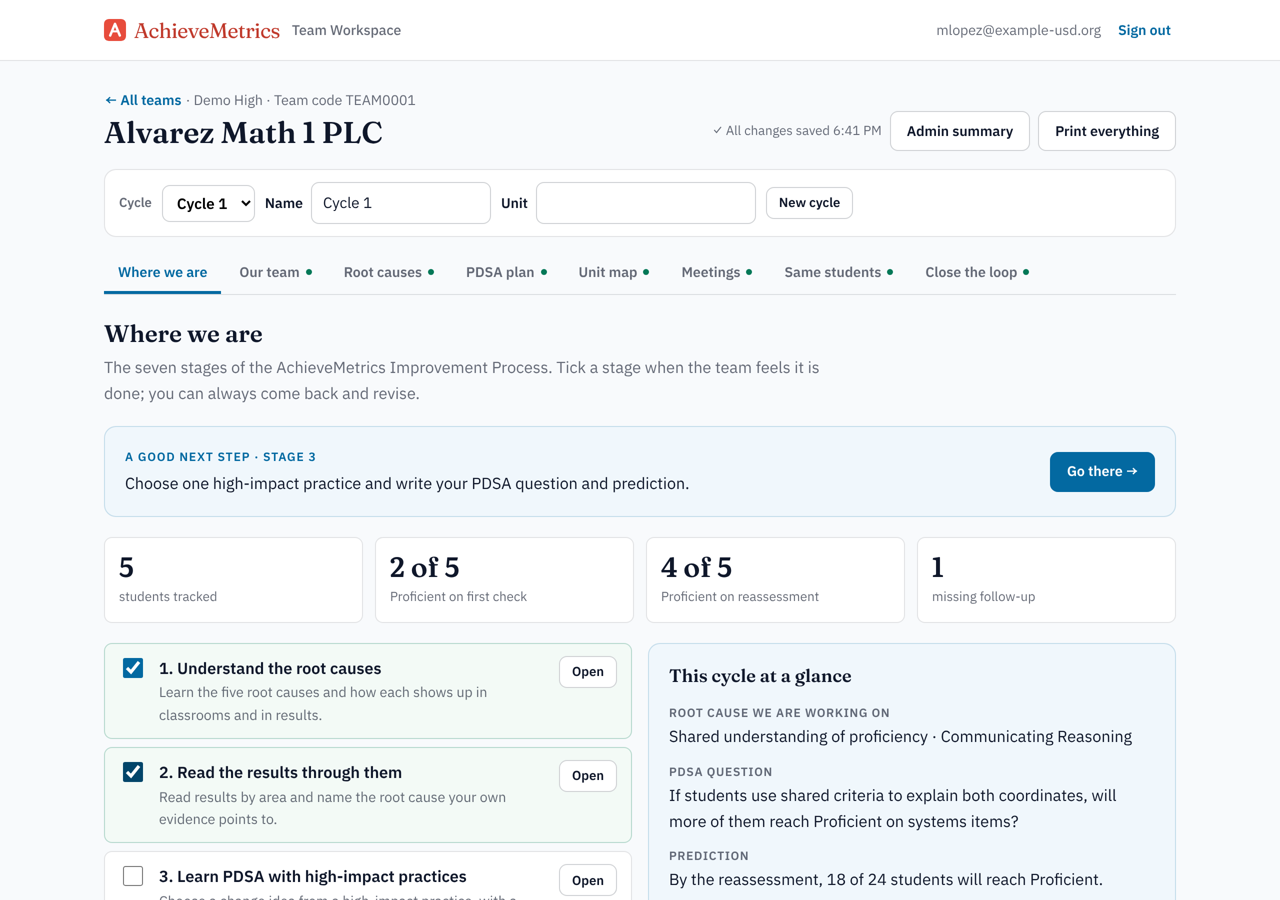
PDSA templates get lost in shared drives. The Team Workspace (with Teacher Pro) keeps everything the team has gone over, meeting to meeting, so anyone can see where the team is and revise as it goes.

  • All seven stages, root causes and the PDSA plan
  • A backward unit map built from actual assessment items
  • Every planning day, check-in and classroom observation
  • A same-students tracker from the first check to the reassessment
  • Print everything, or a one-page summary for leadership

How to sign up

  1. Open the Team Workspace and sign in with an AchieveMetrics Test Bank account, or create a free one.
  2. One teacher starts the team and shares its team code.
  3. Everyone else signs in and joins with the code. That’s it: the same login every time.

Use student initials or ID numbers only. Everyone on a team can read and edit its workspace.

The Team Workspace overview: the seven stages, students tracked, and the cycle at a glance

Want a facilitator for the first semester?

I facilitate PLCs through this process on site: root causes, planning days, and closing the loop with leadership. Teams own the decisions; I bring the structure, the examples and the tools.